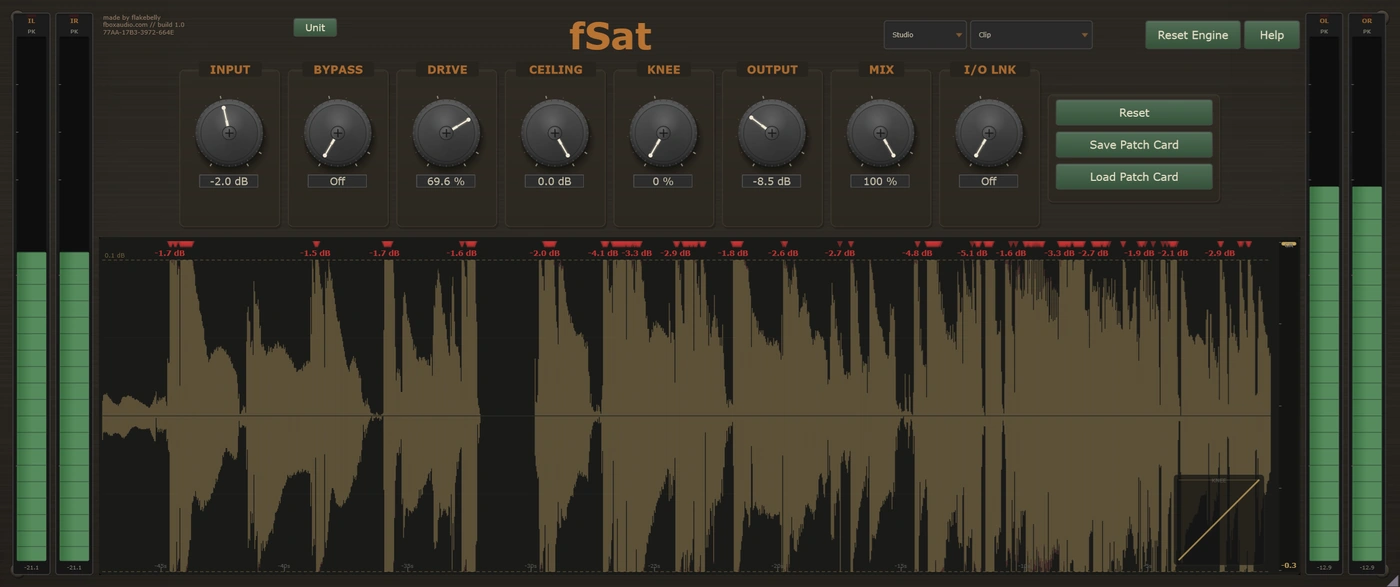
Saturation is what happens when you push a circuit harder than it wants to go. It adds harmonics that were not in the original, and it is a large part of why records made on old equipment sound the way they do.
fPre colours a signal because that is what a preamp does on the way past. fTape colours it because that is what a tape machine does. fSat is the one you reach for when you have decided, deliberately, that a sound wants more harmonics than it has.
Eight modes, each a different way of bending a waveform, from a transformer barely leaning on the signal to a fuzz circuit tearing it apart. Every mode keeps its own settings, so you can try another and come back to find the first as you left it.
The mode is the instrument
Adds weight, not grit
The gentlest mode here by a distance. The lower half of its range thickens and rounds a sound without ever really sounding like distortion. A Weight switch chooses how big and how low the transformer sits underneath it.
Warm, thick and alive
A valve, which means it does not simply distort. It responds to how hard you hit it, squeezing the loud parts and opening up on the quiet ones. Warm and thick low down, present and forward when pushed.
Louder and angrier, never softer
A transistor amplifier driven into clipping. It changes character as you go, not just amount: round and warm at the bottom of its range, hard and gritty at the top. The punch peaks in the middle, so halfway often hits harder than flat out.
Throws an octave on top
Folds the waveform so the output runs at twice the frequency, putting an octave above the note with a metallic ring over it. A Focus control picks which part of the sound gets folded, so the bottom can survive intact.
A stompbox in a plugin
Two diodes deciding how loud the signal is allowed to get, with a tone control after them. Germanium clips early and round; silicon holds on longer and then bites. It is distorting from the first sample, like a pedal that is switched on.
Louder without sounding different
No tone shaping, no compression, nothing frequency dependent. It takes the tops off peaks and leaves everything else exactly as it was. The only mode with a scope, so you can watch precisely what is being removed.
Broken on purpose
Not enough bits, not enough sample rate, and no attempt to hide either. Anything from a fine grain over the top down to barely recognisable, with a Smooth control that decides how raw the result is allowed to be.
The loudest noise in the building
Two fuzz stages stacked, feeding each other. Sustain is the main control: turned down, notes fuzz and then stop dead; turned up, they hang on and keep fuzzing as they fade. Never clean, at any setting.

And they do different things
Drive is the character control. It decides how far into the nonlinearity the signal goes, and in most modes the sound changes as it climbs rather than simply getting more of the same. Push starts round and ends hard. Glow starts warm and ends forward. Silk softens the top as it thickens the bottom.
The input trim is the level control. It changes how hard the stage is hit without moving the mode's character on the way, which matters most in the modes that are already distorting at rest. Link the input and output trims and you can drive it as hard as you like while the level stays where it was.
Then the Mix knob keeps your original signal intact and blends the driven one in underneath. Push a mode somewhere silly, pull the mix back, and you get the harmonics and the weight with the transients still alive in front of them. On the wilder modes that is not a refinement, it is how you use them.
The one mode where watching is as useful as listening
Clipping is invisible by design, which makes it very easy to overdo. So Clip has a scope: the incoming waveform with the clipped result drawn over the top, the ceiling marked across it, and tags along the edge whenever more than a dB is coming off. There is a gain reduction meter and a curve that bends as you change the shape of the corner.
You can see exactly how much you are removing, and stop before it starts to cost you.
The same toolkit, whichever mode you are in
The main control in every mode. How much gain that represents differs from one to the next, which is why the same number is mild in one mode and savage in another.
Blends the driven signal underneath your original. The way to make the wilder modes usable, and the way to keep transients when a mode is squashing them.
Ties input and output together in opposite directions, so you can drive harder for more colour without the level running away from you.
A hard-driven setting cannot blow up your monitors. It can still get very loud, so watch the meters, but nothing here will catch you out.
Mutes the saturation but leaves the trims and the unit's own noise floor in circuit, so the level does not jump as you compare. Use your host's bypass when you want a completely clean one.
Every parameter is automatable from your DAW, including the mode selector itself, and fSat runs anywhere the suite does: on a track in your DAW, in an insert slot in fBox Console or the standalone application, or in a slot in fBox Rack.
Every unit is different. Keep the one you like.
Every instance is minted with its own serial number and its own character, the small manufacturing differences that make this unit sound like this unit and no other.
Every unit has its own threshold: the point where clean becomes coloured. Below it two instances are the same. Above it each one has its own voice, its own balance of warmth against edge, and its own way of moving from polite to obvious. Set two fSats identically, push them both, and one arrives before the other.
Every new instance can be a different unit, or it can be the one you have chosen to keep. The Unit button beside the serial is where you decide.
Saved units live in your Documents folder, a folder per product, so you can find them, back them up and copy them between machines.
A unit is the character. A patch card is the character plus everything you set on top of it. Save a patch card and it carries the unit it was made on as well as the settings, so loading one back gives you a choice: Recall Unit brings that machine back with it, character and all, while Apply Settings Only keeps the unit you are on now and takes just the knob positions.
You cannot choose a unit's character any more than you can choose the character of a real machine. But you can learn it, and you can keep the one you love.
Silk, Glow, Push, Rect, Diode, Clip, Crush and Fuzz. Each a separate engine with its own controls, not a preset.
Every mode remembers its own settings. Try another and come back to find the first exactly as you left it.
Most modes change what they do as the drive climbs, not just how much. The bottom of the range and the top are two different sounds.
Clip draws the incoming waveform, the clipped result, the ceiling and a gain reduction meter, with tags when more than a dB is coming off.
A mix control on every mode, so even the wildest of them can sit under an untouched signal instead of replacing it.
Drive sets the character, the input trim sets the level. Useful in the modes that are already distorting before you touch anything.
Serial-seeded character throughout. Roll a new one, save the ones you like, and pin your favourite so every instance opens as that unit.
Eco for tracking and dense sessions. Studio for mixing. Master for final mixes and mastering.
14-day free trial included - no payment required
The zip holds the plugin, a one-page start guide and the PDF manual. New to this, or not sure where a .vst3 goes? Read the install guide.
Also available in The Character Tools, The Full Outboard Suite and The Full Studio