fBox Rack

Plugin Host and Console Channel

Modular Plugin Rack - VST3

fBox Rack hosts up to eight VST3 plugins, in series or in parallel, with a coloured preamp at the input, a full mix bus section, and a console output stage at the other end.

It is not just a plugin host. It is a complete console channel. The preamp colours your input. Your plugins do the processing. The mix bus shapes the combined signal with summing, EQ, compression and saturation. The console stage colours the output.

Fill the slots with fBox plugins and the whole chain runs on one modelling engine from input to output. Fill them with the plugins you already own and those start sounding like they belong in the same room. It hosts any VST3, ours or anyone else's. Three do not go into a slot: fTape, because the bus saturation and the console output stage both have a Tape mode of their own, and fBox Console and the Rack itself, because a host cannot sit inside itself. Drop it on a track, a group bus or the master, and you have a channel strip that would once have taken a rack of hardware and a desk to build.

Your Plugins. Our Signal Path.

Input Trim Preamp 8 Plugin Slots Summing Bus EQ Bus Comp Bus Sat Console Out Mix / Trim

The highlighted stage is yours to fill

The preamp responds to how hard you drive it, and the console stage responds to the level arriving from the mix bus. Push more in and you get more colour at each stage, so the input trim is a character control as much as a level control.

Every stage after the preamp starts switched off. Load it up, leave everything bypassed, and it is a clean plugin host. Bring the stages in one at a time and it becomes a channel.

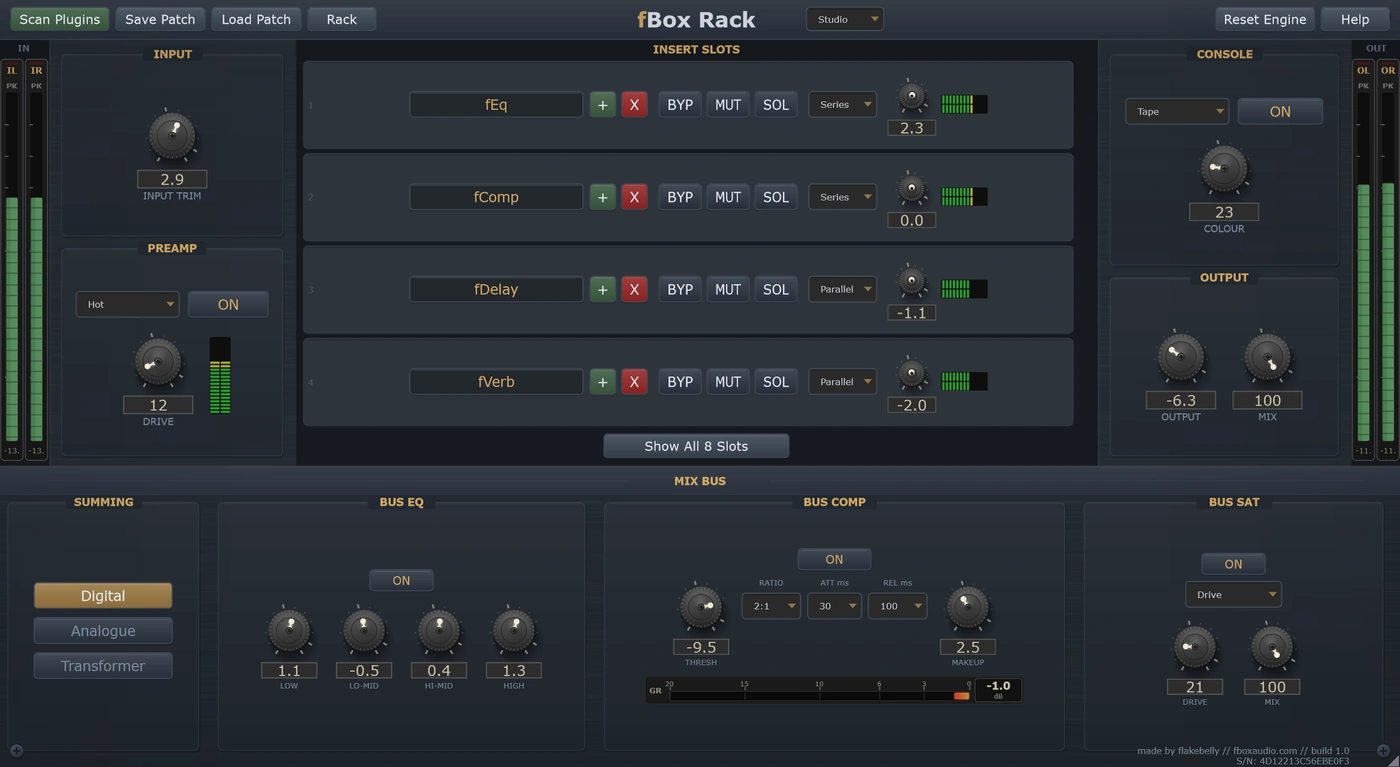
fBox Rack - preamp, plugin slots, mix bus and console output

The Stages

Four sections, each with its own set of voices

Preamp
Four modes with a drive control. Warm brings transformer-style fullness in the low end and rounds the signal out. Hot is transistor grit and mid presence. Valve fattens, breathes under load and sags like a tube stage should. At zero drive they are all effectively clean. Clean · Warm · Hot · Valve
Plugin Slots
Eight slots that take VST3 plugins, fBox or otherwise, four shown until you expand them. Series slots pass audio one to the next. Parallel slots each take their own copy of the post-preamp signal, process it independently, and get summed back in at the mix bus. Every slot has bypass, mute, solo, its own level for gain staging between plugins, and its own meter.
Mix Bus
Where the slots come back together. Three summing modes, from clean through to a heavier transformer sound with crosstalk and low-end resonance. A 4-band EQ voiced for broad musical moves rather than surgery. A VCA bus compressor with a gain reduction meter. And three saturation modes with drive and a wet/dry mix for parallel work. Digital / Analogue / Transformer · Silk / Drive / Tape
Console Output
Five colours for the final stage, with one knob for how much. Warm is rich and full. Punch tightens the sub and pushes the presence for modern impact. Forward crowds the midrange and brings vocals and guitars to the front. Tape smooths harsh digital sources. Start low, around a quarter to a half. Clean · Warm · Punch · Forward · Tape

After all of that sits a latency-matched global mix, so you can blend the whole processed chain against the untouched input for parallel processing of everything at once, plus an output trim and a safety limiter that is always there.

Where It Fits

A Channel Strip On Any Track

Put it on a vocal, a guitar, a drum bus. Load fPre, fComp and fEq into the slots, or your own favourites, and let the preamp and console stage do what a desk does around them. One plugin instead of six.

Glue On A Group Or Master

Summing, bus EQ, bus compression and saturation in the order you would find them on a desk. Use it on a stem bus for cohesion, or across the mix for weight.

Parallel Processing, Properly

Set slots to parallel and each one works on its own copy of the signal before they sum back together. The global mix then blends the whole chain against your dry input, latency matched, so nothing smears.

Fill It With fBox

fComp, fEq, fPre, fSat, fMod, fVerb, fDelay and fDrone all load straight into the slots. Every one of them carries its own character, so a rack full of fBox is a rack of units that exist nowhere else.

If you want the whole desk rather than one channel, that is fBox Console: thirty-two of these signal paths side by side, with group buses, a master section, an automation system and a 16-track tape machine. The Rack is the same thinking applied one track at a time, and it runs in any VST3 host.

Your Unit

Every rack is different. Keep the one you like.

Serial No. 7C4A-19E8-B035-D6F1

Every instance is minted with its own serial number and its own character, the small manufacturing differences that make this unit sound like this unit and no other.

On the Rack that character runs the length of the signal path. One rack's preamp breaks up a touch sooner. The EQ bands sit at slightly different centre frequencies. The compressor grabs transients at its own threshold and breathes with its own timing. The summing bus has its own resonance and crosstalk, the saturation its own warmth, and even the noise floor takes a different colour. No single one of those is obvious on its own. Together they are what gives a rack its voice.

Every new instance can be a different unit, or it can be the one you have chosen to keep. The Rack button in the header is where you decide.

Saved units live in your Documents folder, a folder per product, so you can find them, back them up and copy them between machines.

A unit is the character. A patch card is the character plus everything you set on top of it. Save a patch card and it carries the unit it was made on as well as the settings, so loading one back gives you a choice: Recall Unit brings that machine back with it, character and all, while Apply Settings Only keeps the unit you are on now and takes just the knob positions.

You cannot choose a unit's character any more than you can choose the character of a real machine. But you can learn it, and you can keep the one you love.
At A Glance

8 Plugin Slots

Host any VST3, fBox or third party, apart from fTape, fBox Console and the Rack itself. Per-slot bypass, mute, solo, series or parallel routing, individual level and a level meter.

Four-Mode Preamp

Clean, Warm, Hot and Valve with a drive control. Colour the input before it reaches your plugin chain, or leave it transparent.

Mix Bus Section

Three summing modes, a 4-band bus EQ, a VCA bus compressor with gain reduction metering, and three saturation modes with a parallel mix.

Console Output

Five colours for the final stage: Clean, Warm, Punch, Forward and Tape, with one knob for how much of it you want.

Global Mix

Latency-matched blend between your untouched input and the fully processed chain, for parallel processing of everything at once.

Your Own Rack

Serial-seeded character the length of the signal path. Roll a new one, save the ones you like, and pin your favourite so every instance opens as that rack.

Three Quality Tiers

Eco for tracking and dense sessions. Studio for mixing. Master for final mixes and mastering.

Stereo In, Stereo Out

Put it on a mono track and nothing is lost. It processes in stereo throughout and the output stays stereo.

14-day free trial included - no payment required

The zip holds the plugin, a one-page start guide and the PDF manual. New to this, or not sure where a .vst3 goes? Read the install guide.

Also available in The Rack Bundle and The Full Studio

System requirements →

The rest of the suite