Drone Generator and Signal Mangler
Drone Synthesiser / Audio Processor - VST3
fDrone is three instruments in one box: a drone synthesiser, a signal mangler, and a ring modulator. It makes continuous, evolving tones out of nothing, runs your own audio through a chain of broken-studio character and damage, and ring-modulates anything you feed it.
It is not a static effect. It models a machine with a history. The oscillators warm up over the first minute, drifting as the circuits heat and gradually settling. The tape head magnetises while it runs, so the sound grows a little grittier the longer it plays, until you hit Degauss and clear it. Turn up Age and it develops intermittent faults, like a dodgy connection that comes and goes.
It is built for drone, ambient, noise, sound design, and anything that wants to sound like it came off a machine that has seen better days.
Pure drone generation. Press Generate and it makes the sound itself, with no input and no clip on the track. The whole unit is available to it: both oscillators, motion, damage and character. This is fDrone as an instrument.
Your audio runs through the whole character and damage chain. Leave Generate off and there is no drone at all, so fDrone becomes a pure character effect: broken-studio grime on drums, synths, or a whole bus. Turn Generate on to lay a drone over the top.
Ring-modulates your input against the internal oscillator for inharmonic, metallic, bell-like tones. Small moves in the oscillator frequency change the entire character, which makes it worth automating.
fDrone loads as an effect on an audio track, or as an instrument on a MIDI or instrument track. On an instrument track a played note sets the drone's pitch. It also runs as an insert in fBox Console, in the plugin or the standalone application, and in a slot of fBox Rack.
Because it makes sound out of nothing, left alone it would drone on while your transport is stopped and you are trying to work. The Transport button in the header settles that. On by default, the drone sounds only while the transport is rolling: press play and it arrives, press stop and it fades away, with nothing to automate and nothing to remember. Switch it off and fDrone runs free, sounding whether anything is playing or not. It follows whatever is hosting it, your DAW or either console.
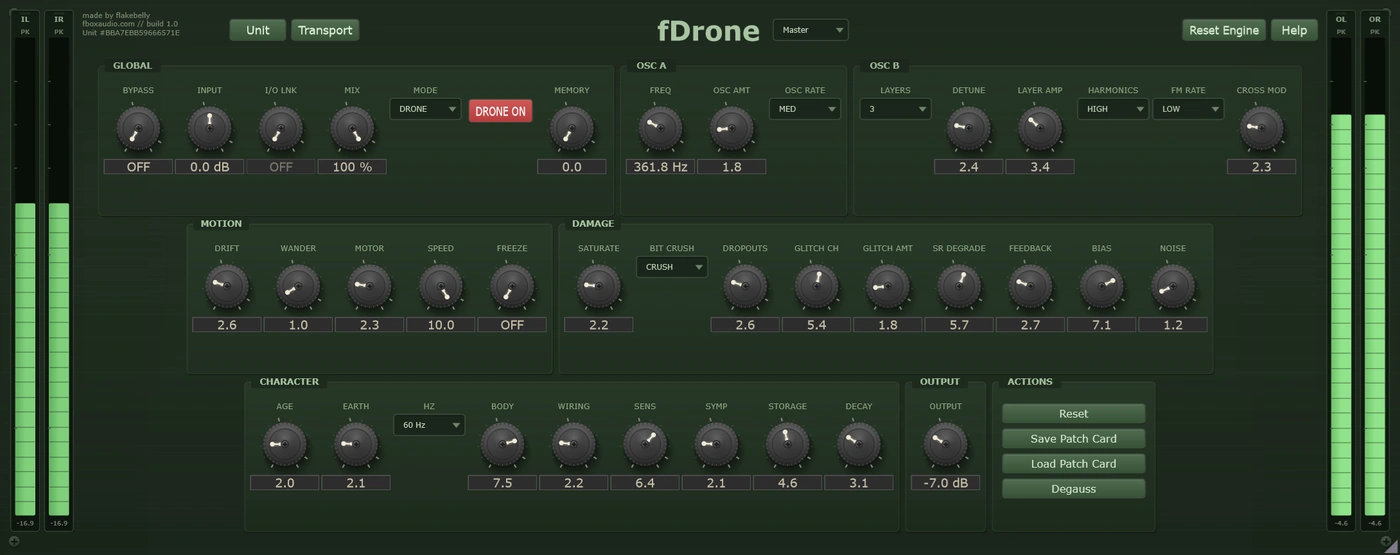
Five sections, and they stack fast
Every unit is different. Keep the one you like.
Every instance is minted with its own serial number and its own character, the small manufacturing differences that make this unit sound like this unit and no other.
On fDrone that character is not a colour on top of the instrument. It is the instrument. One unit's oscillators calibrate a hair sharper. Another's motor wows with its own depth and timing. The noise floor takes a different colour, the enclosure rings at its own frequencies, the mains hum carries its own signature, the feedback path has its own voice, and the two channels never quite match. Your fDrone exists nowhere else.
Every new instance can be a different unit, or it can be the one you have chosen to keep. The Unit button beside the serial is where you decide.
Saved units live in your Documents folder, a folder per product, so you can find them, back them up and copy them between machines.
A unit is the character. A patch card is the character plus everything you set on top of it. Save a patch card and it carries the unit it was made on as well as the settings, so loading one back gives you a choice: Recall Unit brings that machine back with it, character and all, while Apply Settings Only keeps the unit you are on now and takes just the knob positions.
You cannot choose a unit's character any more than you can choose the character of a real machine. But you can learn it, and you can keep the one you love.
Drone generates from nothing. Mix runs your audio through the character and damage chain. Ring modulates your input against the oscillator.
A main oscillator with warm-up drift plus up to five layers, with detuning, harmonic ratios, frequency modulation, cross modulation and stereo spread.
Drift, random wander, tape motor wow and flutter, and an automatable transport speed. Freeze holds the drone in a loop and can dissolve it into grains on release.
Saturation, bit reduction, sample rate degradation, dropouts, glitch, resonant feedback, tape bias with magnetic memory, and a noise floor of its own.
Age, earth hum at 50 or 60 Hz, body resonance, wiring faults, sympathetic coupling from your input, and print-through between tape layers.
The oscillators warm up and settle. The head magnetises as it runs until you Degauss it. Turn up Age and faults come and go.
On by default, so the drone starts and stops with your transport. Switch it off and it runs free while everything else is stopped.
Serial-seeded character across the whole instrument. Roll a new one, save the ones you like, and pin your favourite so every instance opens as that unit.
Eco for sketching, sound design and live use. Studio for most work. Master for the final print.
14-day free trial included - no payment required
The zip holds the plugin, a one-page start guide and the PDF manual. New to this, or not sure where a .vst3 goes? Read the install guide.
Also available in The Character Tools, The Full Outboard Suite and The Full Studio